Plans, limits and billing
See which plan your organization is on, what it includes and how close you are to its limits, and upgrade, change your card or download invoices.
In the app:Plan & billing
On this page
Every organization has a plan. The plan decides how many lines, locations and users it is sized for, and which paid features are switched on. Limits never block your bills: anything that is already in keeps processing, whatever the plan.
See your plan
Go to Settings → Plan & billing. Anyone in your organization can open this page.
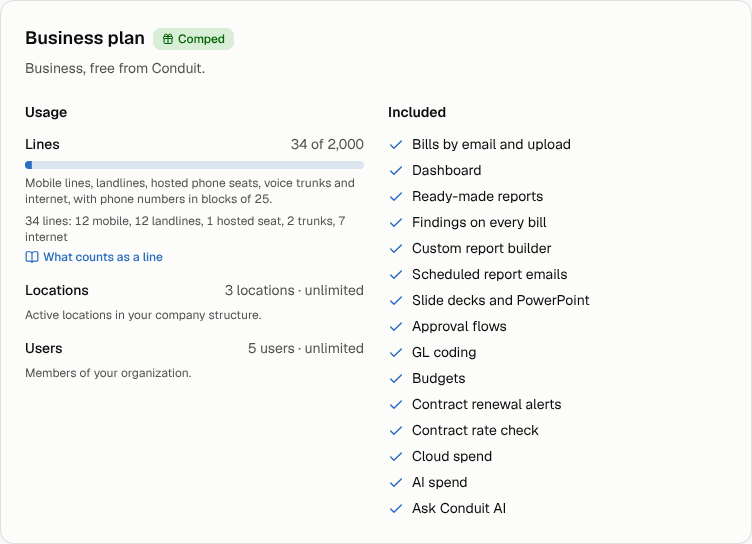
The top card shows the following. During the free trial, a second card compares the trial with the Free plan (see What the trial has, and what Free keeps).
The top card shows:
- The plan name and a status badge, for example Trial · 12 days left, Active, Comped (given to you by Conduit, sometimes until a date), Payment due or Free.
- Usage: how many lines, locations and users you have, against your plan's limits. Under the lines bar, a breakdown shows what makes up the count (for example "52 lines: 40 mobile, 6 landlines, 1 trunk, 3 internet, 2 number blocks (45 numbers)") with a What counts as a line link.
- Included: what you can use, grouped by the plan that adds it (On every plan, Starter adds, Pro adds and so on). Features you have show a check mark; features your plan doesn't include show a lock. Your own plan's group is marked your plan.
What each plan includes
Every plan includes what the plan below it has, and adds more.
Every plan, including Free: bills by email and upload, Conduit AI reading every bill, review and post, plain-language summaries, French bills translated, findings on every bill, inventory and people, employee self-service, company structure (locations, divisions and cost centres), imports from other TEMs and spreadsheets, payments and the AP hand-off, disputes and credits, carrier orders, account management (upgrades and renewals, high-usage alerts, travel passes and requests to your account manager), contracts on file, the dashboard with basic reports and exports, Ask Conduit AI (help questions unlimited, 25 questions about your data a month), roles, security and the audit log, email notifications, service status and the help centre.
Starter adds: the custom report builder, scheduled report emails, slide decks and PowerPoint, approval flows, GL coding, budgets, contract renewal alerts, the contract rate check, custom roles and groups, exports to QuickBooks Online and Xero, and Ask Conduit AI with 200 data questions a month.
Pro adds: AI spend, including live connections to your AI tools' usage, and 500 data questions a month.
Business adds: cloud spend, directory sync, the customer API and webhooks, market-rate benchmarks, your own domain, and 1,000 data questions a month. See See your cloud spend beside your telecom spend.
Enterprise adds: Conduit inventory sync, full white label, 2,000 data questions a month, and terms arranged with us.
| Plan | Price (CAD a month) | Lines | Locations | Users | Ask Conduit AI data questions a month |
|---|---|---|---|---|---|
| Free | $0 | 25 | 1 | 3 | 25 |
| Starter | $149 | 100 | 5 | 10 | 200 |
| Pro | $499 | 500 | 25 | 25 | 500 |
| Business | $999 | 2,000 | Unlimited | Unlimited | 1,000 |
| Enterprise | Contact us | Unlimited | Unlimited | Unlimited | 2,000 |
Help questions to Ask Conduit AI are unlimited on every plan. Questions about your own data (bills, lines, findings, spend) count toward the monthly number, per organization, and the count starts again on the 1st.
Plans are priced by the lines you manage, not per user. The one-time $250 setup fee is waived. The Plan & billing page shows the prices in your currency and the yearly prices, which are 15% less than twelve months.
Lines counts mobile lines, landlines, hosted phone seats, voice trunks and internet circuits one each, and phone numbers in blocks of 25; extensions, devices, add-ons and one-time charges never count. See What counts as a line for the details and examples. Locations counts active locations in your company structure. Users counts the members of your organization.
The free trial
A new organization gets the Pro plan for 30 days: everything in Starter and Pro, including slide decks, the contract rate check, AI spend and Ask Conduit AI with 500 data questions a month. Business features such as cloud spend and directory sync aren't part of the trial. The Plan & billing page says when the trial ends. Afterwards you move to the Free plan unless you upgrade, and nothing you entered is lost.
The person who creates the organization gets a welcome email with the trial end date. Owners and admins get another email during the final seven days, then a confirmation if the organization moves to Free. If you subscribe or Conduit staff arrange a plan before then, the trial-ending emails are not sent.
See how many days are left
While your organization is on the trial, owners and admins see a chip in the top bar, such as Pro trial · 12 days left (on a phone, Trial · 12d). In the last 7 days it turns to the warning colour with a warning icon, and on the final day it says Last day. Select it to open Settings → Plan & billing. The chip disappears once you subscribe or the trial ends.

What the trial has, and what Free keeps
During the trial, the Plan & billing page shows Your trial and the free plan, two columns side by side (one above the other on a phone):
- During your trial (Pro), until the date the trial ends: the Pro limits (up to 500 lines, 25 locations and 25 users, and 500 Conduit AI data questions a month) and the features that are only yours during the trial, such as the report builder, slide decks, approval flows, GL coding, budgets and AI spend.
- After the trial (Free): the Free limits (up to 25 lines, 1 location and 3 users, and 25 data questions a month) and everything Free keeps, such as bills by email and upload, Conduit AI reading every bill, findings, inventory and people, and the dashboard.

Nothing you entered is lost when the trial ends. Anything you made with a trial-only feature stays readable, and going over a Free limit only shows a warning. You can upgrade any time from the same page.
If you upgrade before the trial ends, you keep the days you have left: you won't be charged until the day your trial would have ended, and the Plan & billing page shows that date before you go to checkout. The checkout page lists those days as free days; that's your remaining trial, not a new one. The plan you choose starts straight away, so picking Starter during a Pro trial moves you to Starter's features that day.
When you reach a limit
Limits only warn; they never stop anything.
- At 80% of a limit, owners and admins see a banner such as "Nearing your Pro plan's limit" at the top of every page, and the usage bar on the Plan & billing page turns to the warning colour.
- At 100%, the banner says "Over your Pro plan's limit" (with your plan's name) and the bar turns red. Everything keeps working: bills still come in, get read and post as usual.
When a plan includes one of something, using that included one is the normal baseline and does not raise an alert. For example, a Free organization with its included 1 location sees its usage as 1 of 1 without an alert; an alert starts only if it goes beyond that allowance.
Select See plans in the banner to upgrade.
When a feature isn't on your plan
Where a paid feature would be, you'll see a card marked Paid feature that explains what it does. The card also appears in Ask Conduit AI when your organization has used this month's data questions. Owners and admins get a See plans button; everyone else is asked to check with an owner or admin.
Nothing you made earlier disappears when a feature goes away. Saved reports, decks, budgets, GL accounts and approval flows stay readable; you just can't create or change them until you upgrade. Some automation keeps running on purpose so nothing is left half-way: a published approval flow still routes bills, GL rules you set up still code new bills, and approved bills are still sent to accounts payable.
Upgrade your plan
Owners and admins can upgrade.
- Go to Settings → Plan & billing.
- Under Upgrade, choose the currency (CAD or USD) and, when offered, Monthly or Yearly.
- Select Upgrade to the plan you want.
- Enter your payment details on the secure checkout page that opens.
When you come back, the page says your upgrade is on its way; refresh after a moment if the plan hasn't changed yet. If the page shows Contact us to upgrade instead of the upgrade buttons, select it to write to [email protected] and we'll set it up for you.
Note: If your plan was given to you by Conduit (Comped), there's no upgrade section. Talk to your Conduit account manager about changes.
Change your card, download invoices or cancel
Once you've subscribed, owners and admins see a Payment and invoices card on the Plan & billing page.
- Select Manage billing.
- On the secure billing page that opens, change your card, download invoices, switch plans or cancel.
Your currency is fixed once you subscribe.
Upgrade or downgrade once subscribed
Once you've subscribed, owners and admins see Upgrade to on the plans above yours and Switch to on the plans below it, under Change plan on the Plan & billing page.
- Choose Monthly or Yearly if both are offered, then select Upgrade to or Switch to the plan you want.
- A secure page opens showing the new price and what you pay or get back for the rest of the billing period. Nothing changes until you confirm.
- Confirm. You come back to Plan & billing, which says your plan change is on its way; refresh after a moment if the plan hasn't changed yet.
The change starts right away and is prorated for the rest of the billing period. If your last payment didn't go through, or your subscription is set to end, update it under Manage billing first.
If a payment fails
Owners and admins get an email, and the Plan & billing page says Your last payment did not go through. Update the card under Manage billing to keep the paid features. Bills keep processing either way.